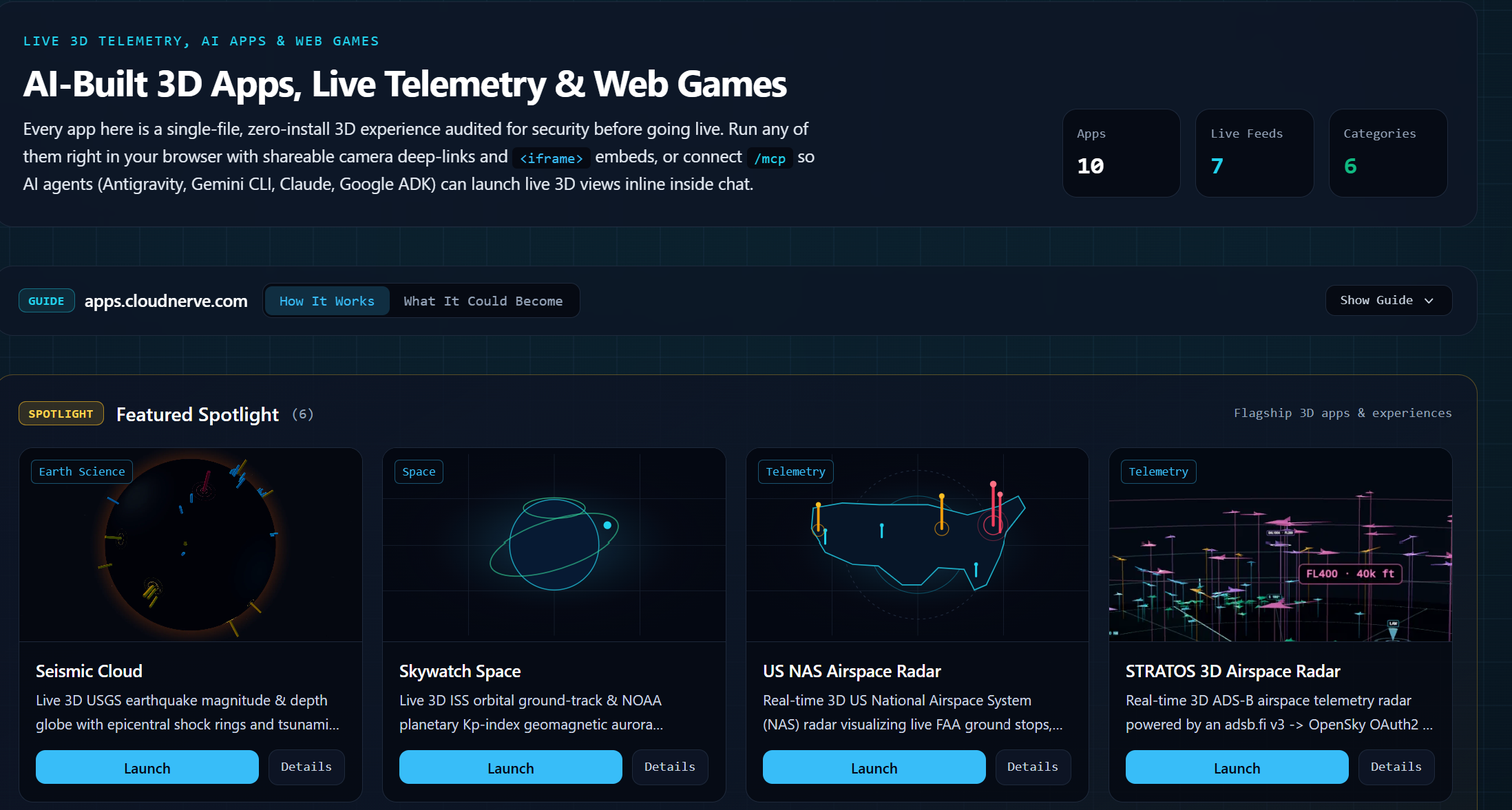
Lately I've been experimenting with a simple question: what if the cool single-file 3D dashboards, live telemetry globes, and mini-games people are generating with AI didn't just die in a local browser tab?
That experiment turned into apps.cloudnerve.com—a live playground running on Google Cloud Run that hosts self-contained Three.js 3D apps and games. The fun twist is that every app works in two ways at the same time:
- For humans: Open it in your browser, spin the 3D scene around, or drop it straight into a blog post like this one with a single
<iframe>. - For AI agents: Connect your agent to the built-in Streamable HTTP MCP server (
https://apps.cloudnerve.com/mcp), and it can actually pull the live telemetry data and render the interactive 3D app inline.
Instead of just talking about it, you can actually poke at four of the live apps right here in the post. Click, drag, zoom, and break stuff—they're all running live.
STRATOS: Live 3D Airspace Radar
This one started because I wanted a clean 3D ADS-B radar that didn't immediately choke on browser CORS errors or API rate limits.
STRATOS streams live aircraft positions through a Cloud Run telemetry waterfall (adsb.fi Open Data API v3 first, failing over to OpenSky Network OAuth2, and gracefully falling back to regional traffic if upstream rate limits kick in). Everything runs on the same origin with a 12-second singleflight cache so even a traffic spike won't hammer the upstream feeds.
Go ahead and drag the radar around, switch regions (Oklahoma, DFW-OKC, Northeast, SoCal), or click a plane to inspect its callsign, altitude, and ground speed:
FSELX Silicon Pulse: Turning a Mutual Fund into a 3D Silicon Wafer
Financial charts are usually pretty dry, so I wanted to see what happens if you pair a legit interactive chart with a live 3D semiconductor wafer.
FSELX Silicon Pulse tracks the Fidelity Select Semiconductors Portfolio (FSELX). Since mutual funds only settle their official NAV once a day at 4:00 PM ET, the backend grabs the latest end-of-day NAV and blends it with live intraday moves from the top semiconductor holdings (NVDA, AVGO, MRVL, ASML, MU, etc.) to estimate an Implied Intraday NAV on the fly.
Use the toggle at the top to flip between the 3D Silicon Wafer (where each glowing die scales with portfolio weight and shifts color with intraday performance) and the Precision Chart (complete with 50/200-day SMAs, capital-gain payout markers, benchmark overlays, and a $10,000 growth slider). It also uses Three.js's WebGPURenderer when your browser supports it and falls back cleanly to WebGL 2 when it doesn't:
Live World Telemetry: FAA Delays, Quakes, Space & Cyber
Once the feed proxy and runtime SDK were working, it became way too tempting to keep plugging in public real-time data feeds.
Right now the live telemetry lineup includes:
- FAA NAS Radar — Live US airport Ground Stops, Ground Delay Programs, and closure NOTAMs rendered as glowing pillars across an extruded wireframe map of the US.
- Seismic Cloud — Past 24 hours of live USGS earthquakes mapped on a 3D globe with magnitude filters and direct USGS event links.
- SkyWatch Space — Live ISS ground track and NOAA Kp-index aurora bands.
- Cyber Pulse Globe — Live CISA Known Exploited Vulnerabilities (KEV) paired with cloud provider health checks.
Here's the FAA airspace monitor live—click any pulsing hub pillar to check what's causing delays right now:
Because It Shouldn't Be All Dashboards: Destroy the Office
Not everything has to be serious telemetry. The gallery also hosts single-file Three.js games—including community-submitted stuff like Twilight Links (3D mini-golf) and WikiPulse Synth (a 3D rhythm synth powered by live Wikipedia edits).
And then there's Destroy the Office: a 75-second stylized low-poly demolition game where you run around a mid-sized office wrecking jammed printers, micromanager whiteboards, and overflowing coffee stations while your coworkers react in real time. At the end, HR hands down an official verdict and lets you download a timestamped "Incident Evidence" Polaroid snapshot of the aftermath.
Zero external textures, zero audio files (all SFX are synthesized procedurally via Web Audio), and totally playable right here:
(Quick nerd note on embedding four WebGL/WebGPU apps in a single blog post: the tiny <5 KB CloudNerve runtime SDK watches IntersectionObserver and visibilitychange, so any embedded scene automatically pauses its render loop and telemetry polling the second you scroll past it—and caps pixel ratio at 1.5x so your laptop fan doesn't try to take off.)
Behind the Scenes: Building Faster (and Cleaner) with Multi-Agent /swarm Workflows
One of the coolest parts of building apps.cloudnerve.com wasn't just the 3D apps—it was how they were built.
Usually, when you're pair-programming with a single AI coding agent on a multi-part feature (say, a new upstream telemetry proxy, Fastify routes, MCP tool definitions, a 2,000-line Three.js frontend, and unit tests), you hit two bottlenecks fast: everything happens sequentially, and by the time the agent gets to the frontend, its context window is stuffed with backend details.
For this project, I leaned heavily on multi-agent /swarm workflows across nine build phases, and it made a night-and-day difference in both speed and code quality. Here's the pattern that worked best:
- Contract-First Before Anyone Writes Feature Code: Before spawning a single worker agent, the coordinator agent locks down the canonical TypeScript interfaces and Zod schemas directly on
main. When everyone agrees on the exact JSON payload shape up front, integration surprises pretty much disappear. - Parallel Isolated Git Worktrees (Stay in Your Lane): Next, the coordinator spins up 2–3 specialized worker agents in separate git worktrees, each with strictly disjoint file ownership. When we built STRATOS, for example:
- One agent built the
adsb.fi v3 -> OpenSky OAuth2 -> fallbacktelemetry proxy and singleflight cache. - A second agent wired the Fastify routes,
/radarendpoint, and MCP tool registration. - A third agent built the entire Three.js 3D radar frontend simultaneously. Nobody stepped on anyone else's files, so merging all three branches back into
mainwas completely clean.
- One agent built the
- An Independent
@verifierAgent as the Bouncer: After merging, a dedicated verifier agent (one that didn't write the feature code) runs a full quality gate:typecheck,lint, the Vitest suite (now 38 tests across API, feeds, MCP, and security scanning), bundle size caps (< 2.5 MBper app,< 5 KBgzipped runtime SDK), and strict CSP verification.
That independent verifier paid for itself almost immediately. In one phase, it caught a third-party globe dependency quietly pulling Three.js's ScriptableNode (new Function) into a compiled bundle—something our own security scanner would have hated—and in another phase it caught a subtle startup delay where live feeds waited for the first polling interval instead of hydrating immediately on load.
Instead of "hope this one massive prompt compiles," /swarm felt a lot more like running a tiny, fast-moving engineering team where every PR actually gets checked before hitting Google Cloud Run.
Built for AI Agents Too (30-Second MCP Setup)
If you use an MCP-compatible AI client, you don't even have to open the website to use the apps or their live data. Point your client at the Streamable HTTP endpoint:
{
"mcpServers": {
"cloudnerve-apps": {
"url": "https://apps.cloudnerve.com/mcp"
}
}
}
There's also a machine-readable discovery file at apps.cloudnerve.com/skill.md so agents can see which tools and feeds are live.
Want to Submit Your Own Single-File 3D App?
Every app on the site has a Details & Prompt modal so you can peek at the actual prompt that created it, copy it, and riff on it yourself.
If you've built (or prompted) a cool single-file Three.js game, visualizer, or dashboard, you can paste or upload your .html right from the gallery on apps.cloudnerve.com. Every submission runs through an automated security scanner that checks for hardcoded keys, eval(), and unsafe network calls, generates a strict per-bundle SHA-256 Content Security Policy, and drops it into my admin review queue before going live in the gallery.
Go take a look around, play a round of Destroy the Office, or try embedding one of the live views in your own notes or site—and let me know what kind of live 3D feed or game I should build next!